Driving Digital Standards: Autodesk Construction Cloud Achieves BSI Kitemark Certification for ISO 19650

Structured and standardized data and information management is critical to delivering today’s complex Architecture, Engineering, Construction, and Operations (AECO) projects. As teams manage growing volumes of project information, digital tools play an increasingly important role in helping organizations work more consistently and efficiently. With this in mind, we’re pleased to share that Autodesk Construction Cloud is now BSI Kitemark certified for compliance with the ISO 19650 Framework — a milestone that reinforces Autodesk’s continued work supporting standards-based collaboration across the industry. This achievement reflects Autodesk’s long-term commitment to building tools that support consistent information management practices and help organizations strengthen their approach to complying with industry standards. What is the BSI Kitemark Certification and Why Does It Matter? The BSI Kitemark Certification is a globally recognized certification for information management issued by the British Standards Institution (BSI). It verifies that Autodesk Construction Cloud supports the workflows and functionality required by ISO 19650, the international standard for managing information across the lifecycle of built assets. As part of a two-stage audit, BSI evaluated Autodesk Docs, Autodesk Build, and Autodesk Construction Cloud's Model Coordination against the software-enabled requirements of: ISO 19650-1:2018 ISO 19650-2:2018 ISO 19650-5:2020 ISO 19650-6:2025 For our customers, this means Autodesk Construction Cloud offers: Alignment with ISO 19650 standards, based on BSI’s independent evaluation of core information management capabilities. Tools that help teams configure project environments in ways that align with their information management practices and requirements. A consistent and organized environment for managing project data, with Autodesk Docs supporting structured workflows across the lifecycle of a project. These capabilities can be especially beneficial for organizations working in regions or markets where ISO 19650 compliance is mandated. Autodesk Docs: Built for Structured Data and Information Management As the backbone of Autodesk Construction Cloud, Autodesk Docs is purpose-built to help teams manage project information with clarity and control. It serves as the common data environment that connects data and workflows across Autodesk Construction Cloud throughout the entire project lifecycle—making it a central area of focus during the BSI audit. Autodesk Docs supports versioning, status codes, revision identifiers, and permissioning that aligns with BSI’s interpretation of ISO 19650. It treats both files and folders as information containers and helps teams avoid duplication by intelligently managing metadata and naming conventions. These capabilities were key components of BSI’s assessment and reflect how Autodesk Docs supports structured information management practices across projects. Structured and standardized data and information management is critical to delivering today’s complex Architecture, Engineering, Construction, and Operations (AECO) projects. As teams manage growing volumes of project information, digital tools play an increasingly important role in helping organizations work more consistently and efficiently. With this in mind, we’re pleased to share that Autodesk Construction Cloud is now BSI Kitemark certified for compliance with the ISO 19650 Framework — a milestone that reinforces Autodesk’s continued work supporting standards-based collaboration across the industry. This achievement reflects Autodesk’s long-term commitment to building tools that support consistent information management practices and help organizations strengthen their approach to complying with industry standards. What is the BSI Kitemark Certification and Why Does It Matter? The BSI Kitemark Certification is a globally recognized certification for information management issued by the British Standards Institution (BSI). It verifies that Autodesk Construction Cloud supports the workflows and functionality required by ISO 19650, the international standard for managing information across the lifecycle of built assets. As part of a two-stage audit, BSI evaluated Autodesk Docs, Autodesk Build, and Autodesk Construction Cloud's Model Coordination against the software-enabled requirements of: ISO 19650-1:2018 ISO 19650-2:2018 ISO 19650-5:2020 ISO 19650-6:2025 For our customers, this means Autodesk Construction Cloud offers: Alignment with ISO 19650 standards, based on BSI’s independent evaluation of core information management capabilities. Tools that help teams configure project environments in ways that align with their information management practices and requirements. A consistent and organized environment for managing project data, with Autodesk Docs supporting structured workflows across the lifecycle of a project. These capabilities can be especially beneficial for organizations working in regions or markets where ISO 19650 compliance is mandated. Autodesk Docs: Built for Structured Data and Information Management As the backbone of Autodesk Construction Cloud, Autodesk Docs is purpose-built to help teams manage project information with clarity and control. It serves as the common data environment that connects data and workflows across Autodesk Construction Cloud throughout the entire project lifecycle—making it a central area of focus during the BSI audit. Autodesk Docs supports versioning, status codes, revision identifiers, and permissioning that aligns with BSI’s interpretation of ISO 19650. It treats both files and folders as information containers and helps teams avoid duplication by intelligently managing metadata and naming conventions. These capabilities were key components of BSI’s assessment and reflect how Autodesk Docs supports structured information management practices across projects. Additional Capabilities Evaluated Through the BSI Audit While Autodesk Docs served as the foundation of the audit, BSI also evaluated how Autodesk Construction Cloud supports a broader set of workflows referenced within the ISO 19650 framework. As part of this review, BSI looked at how Autodesk Construction Cloud supports model coordination and clash detection activities, how design and construction information moves through structured reviews, and how project safety information is documented and managed across teams. The audit also considered platform-supporting elements, including Autodesk’s customer support processes and the cloud-security practices associated with Autodesk Construction Cloud's cloud-based environment. Together, these areas formed the wider context of how Autodesk Construction Cloud aligns with additional components of the ISO 19650 framework. Configuring Your Environment for ISO 19650 While BSI Kitemark certification requirements recognize that Autodesk Construction Cloud provides the capabilities needed to support ISO 19650-aligned workflows, each organization determines how these capabilities are implemented and governed within its project environments. Key steps typically include: Aligning with your Exchange Information Requirements (EIR)/Asset Information Requirements (AIR) Defining folder structures and permissions Setting up naming conventions and metadata fields Establishing governance processes Training teams and maintaining consistent project practices These decisions shape how information flows across a project and how teams work together throughout the project lifecycle. Autodesk Construction Cloud supports your ISO 19650 journey, whether refining existing workflows or establishing new ones. What This Certification Means Moving Forward In short, the achievement of BSI Kitemark certification means Autodesk gives you confidence that your projects are built on globally recognized standards for information management. It’s assurance that your teams can work in a structured, consistent way, reduce risk, and meet compliance requirements where they matter most. Whether you’re aiming for smoother collaboration, stronger governance, or a competitive edge in markets that mandate ISO 19650, this certification helps you get there with clarity and trust. And we’re not stopping here; Autodesk will continue to evolve its products to meet your needs and support the future of digital collaboration.

Read more

Structural Design and Construction of Football Stadium in Mazatlán, Mexico

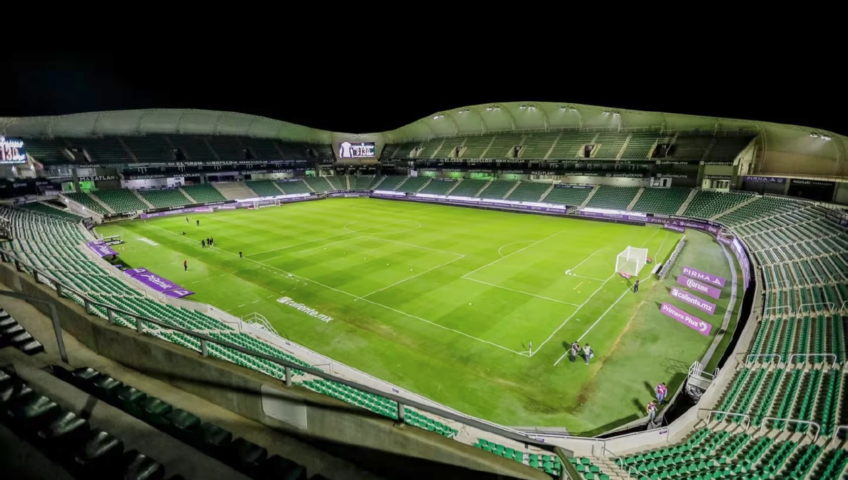
The football stadium in Mazatlán, with a capacity for 25,000 spectators, is home to the local team that plays in Mexico's First Liga. The stadium is partially built into a basin and consists of a large grandstand organized on one level on the south side and two levels on the north, east, and west sides. From the outside, the stands are surrounded by a curved membrane facade, the upper part of which forms a canopy of varying dimensions along the perimeter, partially covering the grandstand. The main structure of the grandstand consists of prefabricated reinforced concrete elements assembled on site with special reinforcement details, connecting them to the concrete poured on site. The prefabricated columns are joined to on-site footings, which support various beams using short brackets, forming the frame structure covered with prefabricated prestressed T-beams. The exterior metal structure consists of a series of curved trusses of varying heights, distributed along the entire perimeter of the stadium, and connected to the various levels of the grandstand, where they transfer their loads. These trusses of varying heights are connected by an upper perimeter ring and intermediate elements that support the enveloping membrane. Engineer Alberto Cervantes Lugo from JCR Estructural was responsible for ensuring the structural safety of this project in accordance with current Mexican regulations. To do this, he created a spatial model in RFEM of the entire reinforced concrete frame structure and metal trusses, applied the loads to them, and carried out the corresponding strength, stability, and serviceability design checks in the add-on modules. Article From: www.dlubal.com

Read more

How Triggerfish’s Animation Pipeline Creates Space for Artistic Freedom

What does it take for a small animation studio to become a leader in the development and production of premium character-driven animation for feature film and TV? For Triggerfish, Africa’s largest and most awarded animation studio, the answer lies in empowering animators and embracing new technologies that let artists be artists. From automated animation pipelines to cutting-edge simulation software and interoperable file formats, Triggerfish prioritises tools that free its animators to craft characters and stories beloved around the world. The Scarecrows’ Wedding, image courtesy of Triggerfish and Magic Light Pictures Director of Production Mike Buckland and CG Supervisor and Layout Supervisor Chris Cunnington both came up through the animator ranks, so they know firsthand how important systems and tools are to facilitating creative storytelling. Buckland studied graphic design in his native Zimbabwe and started his career working in advertising. After seeing Toy Story, he became excited about 3D animation and began an internship at a small animation studio in Harare. “We did a lot of work and a lot of variety, so I learned everything from dealing with clients to editing to compositing,” he says. “I’ve always had a passion for designing characters and making cartoons, so I started making short films.” Buckland moved to South Africa to focus on films and joined Triggerfish in 2007 to help transform the studio’s focus from stop-frame animation to CG animation. Cunnington also began his career in advertising, specifically in the signage industry. “I started a small company with my father, creating vinyl signage, he says. “We bought ourselves one of those vinyl-cutting machines, saw a gap in the industry, and expanded out from there.” Sign creation evolved into graphic design and website work. Wanting to take his skills to the next step, Cunnington sold the company to a friend and used the proceeds to pay tuition in a 3D animation program. After earning his diploma, Cunnington worked for a gaming company before segueing into animation, joining Triggerfish in 2009 to lead the stereography department on a movie project. It was around this time that Triggerfish began to take off on the global stage. “When Chris joined us in 2009, we’d just gotten funding for our first feature film, Adventures in Zambezia,” Buckland says. “Then we did another feature film called Khumba. Both got international distribution and release, which was really exciting and gratifying.” Over the years, Triggerfish has grown into Africa’s leading animation studio, winning Emmys, Annies, and other international awards, and creating work for such prestigious clients and partners as Disney, the BBC, Netflix, Lucasfilm, Magic Light Pictures, Hasbro, eOne, Ubisoft, Cake, Nickelodeon, Warner Brothers Animation, Sesame Workshop, and Sony Pictures Animation. A pipeline that lets artists be artists When Triggerfish set out to make feature films, the projects quickly became too complex to manage with just a few spreadsheets. At first, Buckland says, the team created a homegrown solution. “We wrote our own production-management software, mostly around keeping track of tasks and the status of various departments. We used that for two or three projects, and it was great, but it was self-managed and became too much of a burden to maintain.” They shifted the pipeline to Autodesk Flow Production Tracking, and quickly came to rely on it for task management, review management, and more typical artist-related work. About five years ago, during a period of downtime between major projects, Triggerfish undertook a massive overhaul of its animation pipeline. “Our pipeline at the time was kind of manual, a bit more human-managed, with a lot more internal messaging linking things in,” Cunnington says. Opting to start from scratch, the team built a new pipeline around the guiding principle of “let artists be artists.” “The goal was to not have artists worrying about the technicalities of file storage and scene content,” Cunnington says. “We built a user-friendly interface that allows artists to focus on their work. For example, if they are working on an asset for look dev, they can do their work, and when they publish, the system takes over and places it in the correct location, whilst layering and merging other assets as required.” For the new system to properly manage files, the team needed to standardise deliverables, creating, what Cunnington calls, “freedom within a framework.” He explains, “Artists have the freedom to be creative, but deliverables need to be structured within a more regimented framework. We have a validation tool that checks all assets and kicks back files with issues to be fixed before handing off to the next department.” “We also do a lot of behind-the-scenes processing with mayapy, the Maya Python interpreter. An artist might publish something, and that asset is reprocessed multiple times in the background without their knowledge.” It’s all managed in Flow Production Tracking, which gives the team a comprehensive database for tracking and managing assets of every type. “Not only do we create our main characters and main sets and publish those review turntables up onto Flow Production Tracking for review, but we then assign that same character to a shot as a sub asset,” Cunnington says. “We use that to track all the related assets that are supposed to be built into a shot for lighting and rendering.” “When an artist says, ‘I want to work on shot 1010,’ Flow Production Tracking presents them with all the relevant assets—characters, environments, props—and then they can tick those boxes and import the assets for the shot.” Working with this structured and automated pipeline for the past few years has reduced downstream problems and kept assets moving more smoothly, enabling the studio to streamline its departmental structure even as it has created its most ambitious projects to date. Create, render, simulate—filling an animator’s toolbox Triggerfish uses Autodesk Maya for modeling, rigging, and animation, as well as layout for previz and camera work, and set assembly. Buckland explains that Maya was the logical choice given the company’s size, the scale of its work, and the prevalence of Maya skills among the animators joining the team. Tiddler set dressing done with Bifrost in Maya, image courtesy of Triggerfish and Magic Light Pictures Similarly, the studio has used Autodesk Arnold rendering for years. “When Arnold came out, we immediately adopted it,” Buckland says. “It was just much easier to work with. We got better results, quicker renders, and better-looking lighting.” “It’s basically the best third-party render engine available,” Cunnington adds. “The others don’t get near the speed and quality that Arnold has.” For future projects, the team is exploring the use of GPU rendering with Arnold. “We’re still in the testing stage, but we’ve been excited by the leaps and bounds that the GPU rendering side of Arnold has been taking.” “We don’t want an artist sitting around waiting for their own machine to kick out a turntable when it’s not necessary.” The team has taken advantage of the Autodesk Media & Entertainment Collection to bundle multiple Arnold seats with each Maya license. “It’s mainly about making sure that we have sufficient render nodes available,” Buckland says. “Again, it’s about letting artists be artists.” Intricate environments made easy with procedural capabilities Maya’s procedural content creation tool, Bifrost, has also proven useful on recent projects. Cunnington began using Bifrost several years ago during work on Tiddler, the Magic Light Pictures film about a fish, which required scatter systems for parts of the underwater environment. “I poked around with a different tool for a couple of weeks and could not make it do the things I needed to do,” Cunnington says. “I started asking, what are the other options? The one that came up very quickly and that answered a lot of my questions was Bifrost.” He found that Bifrost was compatible with the production’s pipeline and allowed him to create multiple instances of files. “Bifrost checked all the boxes, one of the big ones being creating multiple vertex maps color sets on a single input mesh. It just gave me that power that I didn’t have in the other tool and solved all the problems that we were foreseeing, ” Cunnington adds. “On The Scarecrows’ Wedding, our most recent work for Magic Light Pictures, it’s being used for actual prop work: for creating tree canopies, bales of hay, along with scattering massive fields of wheat and grass.” “When it comes to complex asset creation, Bifrost has become one of our go-to tools, revolutionizing how we approach some of the most intricate environments.” “Take, for example, the creation of five unique trees, each with a custom-designed canopy. By leveraging Bifrost’s power, we were able to instance every single twig and place apples on those twigs with precision, all while maintaining complete control over the canopy shape. This flexibility was key in achieving exactly what the directors envisioned.” Bifrost, Maya’s 3D procedural content creation tool, is used for intricate environment work like creating tree canopies, bales of hay, along with scattering massive fields of wheat and grass. One of the standout challenges in the film required a vast wheat field, which needed to appear both in its fully grown and harvested states. Here, Bifrost’s procedural capabilities really shone. Instead of painstakingly painting new vertex maps or manually placing each row, they could effortlessly control the placement of the wheat. The rows were arranged as if sewn by a tractor, and during live reviews, they had the power to dial in the number of rows on the fly. From the grass scatters that blanket the ground to the hay bales and even every tiny pebble, Bifrost played a huge role in ensuring that every shot of the film felt organic. “Bifrost gave our artists the freedom to focus on the art while it handled the heavy lifting, making it an indispensable part of our pipeline. In every frame, Bifrost played a role behind the scenes, creating the world our story inhabits.” says Cunnington. Bifrost also made it easy for Cunnington to create scatters that can be shared with animators and readily managed within Triggerfish’s pipeline. “Bifrost is able to output an OpenUSD file of the proxy geometry of scatters that animators can import into their environment in a lightweight form. From a pipeline perspective, we can move the Bifrost graph into an object that we can parent into our assets for easy publishing.” Three years on, Bifrost is an important tool for the studio’s current projects. “It’s slowly creeping more and more into the pipeline,” Cunnington says. “Where it was just used for dressing on the previous project, it’s now being used for actual prop work, for creating bales of hay, for destroying that bale of hay.” Empowering data interchange with OpenUSD One of the most significant factors in Triggerfish’s ability to take on increasingly complex projects while still giving animators freedom to focus on their art is the studio’s embrace of Universal Scene Description (OpenUSD) to ensure data interoperability. “It’s now the de facto standard in the studio,” Cunnington says. “Everything gets exported out as OpenUSD, and we know that any software will be able to read that OpenUSD in.”  “Where do we need assets to come from? It doesn’t matter. As long as it’s output in the correct OpenUSD structure, we can use it anywhere.” But beyond OpenUSD’s usefulness for data interchange, Cunnington appreciates the format for its structure and portability. “OpenUSD’s power comes from its layer and composition arc systems,” he explains. “When you layer two OpenUSD files that have a similar scene, hierarchy, or graph structure, they overlay each other perfectly, and merge into each other.” “The size of the files is actually quite amazing,” he adds. “A binary OpenUSD file is a massive size saving over any other file format. For example, when I initially exported grass scatters for the animation team, it was a 1.6 GB file, which is a bit too heavy to copy over to local computers and have in your viewport. OpenUSD’s native instancing solved that immediately. I instanced the standardized grass tufts, and we then could produce that same file with only 40MB. It loads in the viewport nearly instantly, the animators are happy, and there’s no like lag time for them.” As Triggerfish continues to expand and scale, the team will continue to explore new tools that can help power their uniquely flexible, artist-focused animation pipeline. For Buckland and Cunnington, the priority will always be freeing animators from technical hassles so they can focus on doing what they do best: creating characters and stories that resonate on the global stage.   Article From: www.autodesk.com

Read more

Tekla Structures: The best problem solver in detailing

By utilizing Tekla software, Advenser Engineering was able to revolutionize its approach to a major school replacement project, thanks to its superior 3D modeling and efficient workflows. Tekla's advanced features were crucial in improving communication, streamlining coordination, and accelerating the construction process. Advenser Engineering is a renowned CAD & BIM service provider in the global AEC industry, backed by 16 years of experience. Their expertise lies in meeting the specific needs of architects, builders, fabricators, engineers, and contractors. Since its inception in 2007, the company has consistently adapted to technological advancements to maintain its competitiveness. Through continuous improvement, they enhance their capabilities and widen their range of services. They assure that the key to their success lies in their commitment to developing, reinventing, and aligning  knowledge with the changing demands of the AEC sector. “We chose Tekla software to manage the whole process from the commencement to delivery of this project so that we could support our client on job planning and project management. Tekla enabled us to maintain our quality throughout the detailing process even though we faced several challenges. The needs of the customer may be innumerable, but the solution is one word - Tekla Structures! Today, Advenser acknowledges that investing in Tekla software was one of our most decisive steps that helped open doors of larger General Contractors, Fabricators and Erectors, for us, since Tekla is the software of choice for most of them too.” - Mr. Harikrishnan K, Director, Advenser Engineering Services Pvt. Ltd. Establishing the new 193,000 sq. ft. Fairmont Heights High School Prince George's County Public Schools, the owner, selected Grunley (GC) for the $80 million replacement of the old Fairmont Heights High School. The new 193,000-square-foot high school replaced the existing facility in Hyattsville, Maryland. The design of the new school facility provided improved layouts that maximized the potential for use by different community groups while separating the academic and administrative spaces from the full-size gymnasium, cafeteria, and auditorium. The high school includes new athletic facilities comprising a stadium, soccer field, baseball field, and athletic support amenities. At Advenser, their main objective/responsibility for this project was structural steel detailing. They were responsible for delivering shop drawings, models, GA drawings, reports, and bills of construction materials. Challenges  faced by the construction project team Tight job schedule: The project was to replace the old Fairmont Heights High School with the new 193,000-square-foot high school. Since the school authorities didn’t want to interrupt the school's functioning, the project timeline was further restricted, and the executing team had to deliver the project on a very tight deadline. Design change: The client requested the initial approval drawings, but the unavailability of an accurate connection design hindered the operations during the onset of this project. Other trade coordination: The project comprised many joists, concrete members and RTUs. The project team had to fix joists as per the joist manufacturer’s drawings and had also to add connections for joist supports. Erection of steel members: Early steel members are always “hot” while considering their significance in site erection. Similarly, embed plates, loose lintels, and anchor bolt modeling were tedious tasks for the executing team. Large number of RFIs: Preparation and tracking of RFIs were also a huge challenge for the team Complicated modeling: As per the architectural designs, connections were complicated. The majority of the brace connections were changed to the complex because of wind load calculation. The project team simplified these connections using Tekla’s Custom Components. Further, the team included various miscellaneous modeling like stairs, rails, ladders, etc. Tekla Structures: The best problem solver in detailing The project team faced a significant concern regarding design changes due to the unavailability of accurate connection design. Fortunately, the macro application platform offered by Tekla Structures proved to be useful in modifying the connections after the final design had been achieved. The execution of Joist drawing coordination was made easy by using accurate 3D models, which were created by inserting the PDF as a reference. Additionally, the project team had no trouble modeling RTUs thanks to the helpful visualization provided by the precise 3D models. While some revisions were required, the final deliverables were submitted without any discrepancies. To facilitate coordination, IFC files were also received. The Tekla Structures tool proved to be particularly useful in this stage. Finally, the coordination output files exported from Tekla were well-received by the other trade coordinators involved in the project. With the advanced options provided by Tekla, incorporating close to 250 RFIs and their related responses into the model was a seamless process. Utilizing a 3D model snapshot, the project team could clearly communicate issues with the client, architects, engineers, and manufacturers for improved coordination. The ease with which RFIs were handled allowed for a smoother overall project process. The Tekla interoperability feature proved to be highly beneficial for the project execution team as it facilitated seamless coordination with the client using various tools such as Trimble Connect and Tekla Model Sharing. Additionally, the team could effortlessly export DXF, KSS, and STP files on request from fabrication shops. Utilizing Tekla Structures offered a host of advantages. By utilizing the software, the executing team could expertly coordinate the steel member erection, skillfully placing concrete elements and locating early steel to sidestep any potential issues on the project site. Furthermore, Tekla’s user field options, phasing capabilities, and other tools effectively tackled various miscellaneous items, such as stairs, rails, and ladders, that are notoriously challenging to track on larger projects. Additionally, Tekla Organizer facilitated multiple submissions, streamlining the submission process and ensuring a smooth project timeline. “One of the key factors while considering my responsibilities as a ‘AGM Engineering’ is to boost my team’s overall productivity and ensure the quickest project delivery. And in this, Tekla Structures has been an amazing tool for achieving our goals. While comparing to other software tools that would need hours to complete a task, Tekla Structures consumes only a few minutes - which is indeed an amazing thing! We are extremely satisfied with its features and look forward to continue working & growing with this industry-leading tool.”- Ms. Rekha Murali, AGM Engineering, Advenser Engineering Services Pvt. Ltd.   Article From: www.trimble.com

Read more

Volano Building Siena Hospital, Italy

Located on Viale Mario Bracci in Siena, "Santa Maria alle Scotte" is a prominent Italian hospital. To enhance its efficiency and modernity, the University Hospital of Siena (AOU) initiated a comprehensive redevelopment plan, which includes both aesthetic and functional improvements along with reorganization of the existing facilities.   The redevelopment includes the construction of the Volano building, designed by ATI Project, which plays a central role in preparing the site for future renovations. This building will initially establish core hospital spaces, essential for relocating functions and facilitating a smoother renovation process. It serves as a critical foundation for subsequent modernization efforts, supporting a transformation that aims to enhance the hospital’s capacity and operational efficiency. In terms of construction and design, the Volano building is engineered to eventually evolve into a new structure that accommodates essential hospital functions, allowing the release of space in critical departments and minimizing disruptions. This carefully phased approach ensures continuous, safe operation within the hospital while accommodating upgraded facilities, expanded spaces, and modern technical solutions for a sustainable and adaptable healthcare environment.   Article From: www.dlubal.com

Read more

Precision and speed in connection design: Brazilian engineers reshape their workflow

As projects grow in complexity, efficiency and precision become vital. Brazilian company CODEME, together with BIM WORKS Brasil, improved its connection design process using IDEA StatiCa, replacing manual work with an integrated and faster workflow, cutting design time on complex steel details by over 90%. As CODEME’s projects expanded, engineers faced growing pressure to deliver precise designs within shorter timelines. Working closely with BIM WORKS Brasil, the team often tackled complex steel and concrete structures requiring reliable verification of forces and details. To keep up with increasing demands, they needed a way to reduce manual work, improve accuracy, and ensure every project stayed on schedule. Traditional spreadsheets had served well for years, but they were no longer enough to meet the complexity and pace of modern engineering. The challenge – accuracy under pressure Each complex steel connection required hours of manual input and force calculations. One connection could take up to six hours to finalize. In addition, integrating results from different design platforms into downstream BIM workflows created extra friction and increased the risk of inconsistency. With more international projects on the horizon, another challenge emerged: the need to communicate results clearly across multiple languages. Engineers had to deliver accurate documentation that clients abroad could easily understand and verify. CODEME’s team realized that improving accuracy, clarity, and speed would require a change in both process and tools. The approach – connecting tools and teams To overcome these challenges, CODEME implemented IDEA StatiCa, integrating it directly into their existing workflow with Autodesk Robot and Tekla Structures. This allowed engineers to import all acting forces at a node directly into the IDEA StatiCa Connection app and perform complete verification of all components in one environment. This interoperability eliminated manual data transfer and simplified verification. Engineers could now model, calculate, and document connections with full accuracy, saving valuable hours and reducing the risk of human error. “Before, our connection design process was tedious and slow. Now it’s accurate and efficient.“ What changed – clarity, confidence, and collaboration The impact was immediate: what once took six hours could now be completed in just a few minutes, saving over 90% of engineering time. Beyond speed, IDEA StatiCa gave CODEME new levels of transparency. Every calculation step was stored and traceable, allowing engineers to review results, validate assumptions, and make better-informed decisions. Multilingual reporting also made a real difference. By generating reports in Portuguese, English, and Spanish, the team bridged communication gaps with international clients and avoided misunderstandings during design approvals. “It helped us communicate more clearly with clients and made technical discussions much easier.” Lessons learned – people and support matter Behind every successful change is great support. CODEME engineers appreciated the fast and knowledgeable technical assistance they received from the IDEA StatiCa support team during implementation. It gave them confidence to adopt the new process without interrupting ongoing projects. “Technical support has always been prompt and knowledgeable. We really value that.” By combining interoperability, automation, and strong communication, CODEME not only improved efficiency but also strengthened collaboration with partners and clients. Their workflow became more predictable, their documentation clearer, and their outcomes safer and more cost-effective. Key takeaways 90% time savings per complex connection Fully traceable workflow for greater confidence Multilingual reports supporting international collaboration Faster delivery and clearer communication across teams CODEME’s experience shows that progress in engineering isn’t about doing more. It’s about doing things smarter, with precision, clarity, and confidence. www.ideastatica.com

Read more

Structural engineering in urban spaces with Tekla Structural Designer

When Mason Navarro Pledge was appointed as engineering consultants on the new Stephenson Way student accommodation development, the team turned to Trimble’s multi-material structural design software to provide the streamlined workflows and interoperability required. Stephenson Way is a proposed new student accommodation development in the heart of London, with a focus on elevating student living. Located near Euston Square tube station, the design is a 72-unit, 8-storey building, featuring a single-storey basement and containing 1,500 cubic metres of concrete. As expected, the development faces a congested site footprint, surrounded by existing multi-storey buildings of a similar height. Mason Navarro Pledge, the engineering consultancy firm, was appointed to provide structural and civil engineering services on the project, taking it from Stage Two to Stage Six / Seven of the RIBA Plan of Works (PoW). The busy city-centre location presented the team with two key structural challenges: the first, an existing curved vehicular ramp, which provides access to the rear of one of the existing buildings, and had to be maintained as part of the new development. The second being complex party wall issues, with neighbouring buildings close to the boundary line on three sides (including one flank wall which had to be retained by the new development) and a highway adjacent to the fourth side. Mason Navarro Pledge carried out the structural design works within Trimble’s Tekla Structural Designer software. Speaking about the project, Leo Corney, Structural Engineer, said: “At Mason Navarro Pledge, we’ve been using Tekla Structural Designer for many years. While the software is perhaps predominantly known for its steel capabilities and the interface with Tekla Structures, it is just as valuable for concrete design. “Personally, I’ve used a variety of design and analysis software packages over my career to date and there are certainly a few features within Tekla Structural Designer that offer enhanced value to my work. For example, it’s easy to modify stiffness properties and isolate individual elements for review. Long-term slab Deflection Analysis is another area that the software exceeds at. In current UK concrete construction, flat slabs are most commonly used because of their geometric flexibility and ease of passage for MEP containment. Flat slabs are usually governed by long-term deflection, so this is where a lot of our time as engineers is spent when it comes to concrete construction. Long-term deflection checks are made more time efficient with the software’s Check Line feature, where we can pre-set limits. You can also easily model and assess column positions and beam locations within the one software model, cutting out the middleman. This is especially valuable when you’re at the early stages of a project and trailing various column and grid layouts.” On Stephenson Way, it was the software’s interoperability and streamlined workflow that was perhaps the most beneficial for the team, saving valuable time and resources, as well as aiding coordination between disciplines and software suites. Leo commented: “The architect supplied us with CAD layouts of the floors, which we were able to import as DXFs directly into Tekla Structural Designer and model the structure in line with the architectural and structural design. This allowed us to accurately alter the model geometry without either using a third-party software (such as Revit) to first model the geometry to the architect's layout and importing that model into the analysis software; or painstakingly measuring out all the gridlines by hand and recreating the model from the architect's drawing. “Different structural geometry such as column positions, section sizes and slab depths were also tested within the model, and the geometry exported to Revit using the Tekla Structural Designer BIM Integration tool. From this, structural drawings were produced and sent to the architect. “This seamless and reliable direct data transfer from one software to another is a huge time saver, meaning that we don’t have to duplicate work or manually check for any small changes or problems between different software or model versions. It is a far more efficient workflow.”   Article From: www.trimble.com

Read more

GEO5 2026 – News & Improvements

1. Drawing Editor – New Program A completely new program designed for creating drawings and outputs from any GEO5 application. Main Features: Transfer images and drawings from any GEO5 program with a single click Add dimensions, descriptions, legends, title blocks, or company logos Import photos and external graphic materials in various formats Work in defined technical scales or fit drawings automatically to the window size Create clear, professional drawings ready for printing or PDF export Benefit: Professional outputs directly within GEO5 – no need for external CAD software, saving time and maintaining a unified appearance of project documentation. 2. Point Cloud – Major Upgrade  The program has been completely redesigned and now functions as an independent, fully featured tool. New functionalities include: Modeling multiple construction stages to monitor project development over time Direct data transfer to and from Stratigraphy using FineClipboard ASCII import (TXT, ASC, etc.) for broader data compatibility Creation of high-quality graphical outputs for printing and documentation Benefit: Better tracking of construction progress, faster data processing, and less need for data conversions. 3. GEO5 – FIN EC Communication (Design of Reinforced Concrete, Steel, and Timber Members) It is now possible to automatically transfer input data and results from GEO5 programs to FIN EC for the design and verification of reinforced concrete, steel, and timber members. This enables the calculation of bearing capacity, cracks, and deformations without manual data entry between geotechnical and structural programs. Benefit: Fast and reliable data exchange – saves time and eliminates potential errors when transferring between structural and geotechnical programs. 4. Sheeting Check, Sheeting Design, Anti-Slide Pile – Effect of Steel Corrosion and Interlock Slip in Sheet Pile Walls The program now allows engineers to consider corrosion rates of steel retaining elements (sheet piles, pipes, I and U sections). For U-type sheet piles, it is also possible to account for the effect of interlock slip on wall stiffness and bearing capacity using coefficients βB and βD. The consideration of corrosion and interlock slip is available for all design standards supported by the program. Benefit: New options for designing retaining walls – enabling more realistic analysis and design of sheet pile and retaining structures. 5. Slope Stability (+ FEM) – Variable Undrained Shear Strength (cu) with Depth It is now possible to define the undrained shear strength (cu) of fine-grained soils as a function of depth. Benefit: More realistic design and assessment of slope stability and geotechnical structures in fine-grained soils. 6. Cantilever Wall – New Custom Wall Shapes Users can now define custom retaining wall shapes, including special geometries commonly used in Belgium and China. 7. Spread Footing and Spread Footing CPT – New Geometry: Three-Step Footing A new geometry type allows defining foundations with up to three height steps. Benefit: More flexible foundation design and optimized material usage. 8. FEM – New Features Calculation of internal forces on a virtual beam along any chosen reference line. New catalogs and types of steel and composite cross-sections. Additional output parameters such as modulus of elasticity, mobilized shear strength, and others. Parallelized result processing – computations are now distributed across multiple CPU cores, reducing calculation time by up to 40%. Benefit: Simplified modeling, faster work with structures, and easier verification of results. 9. Stratigraphy – New Functions New modeling workflow without the need for a “master borehole” – layers and interfaces can now be defined directly. Ability to load source data (background maps, site documentation) in PDF format. Import of geotechnical data in AGS format. Creation of user-defined hatch patterns for different soil and rock types. Soil and rock hatch patterns according to the British Standard BS 5930 – Code of Practice for Site Investigations. Benefit: Faster creation of 3D geological models and easier integration of geotechnical data into the project workflow 10. Pile Group – Mass Selection and Editing Users can now select and edit multiple piles at once in large-scale projects. Benefit: Significant time savings and consistent data management in complex pile group designs. 11. Switching Help Language All GEO5 programs now allow users to switch the language of the contextual help directly within the interface.   Article From: www.finesoftware.eu

Read more

Integral Executive Project for Restoration of San Francisco Temple, Argentina

The integral executive project for the restoration of the San Francisco Temple in San Miguel de Tucumán aims to assess its structural stability and define strengthening measures. Based on on-site studies and a computational numerical model, soil-foundation stresses, the behavior of vaults and walls, and the distribution of loads are analyzed. Key hypotheses about previous settlements, cracks, and modifications are considered to guarantee an efficient restoration that respects the historical heritage. This restoration project is based on the generation of a computational numerical model that precisely reproduces the geometry and loads of the San Francisco Temple in order to evaluate the soil-foundation contact stresses. Key hypotheses are considered, such as the stability of the settlements, the crack formation, and the preservation of structural integrity. Furthermore, previous modifications are taken into account, such as the removal of the filling material on the vaults, which was intended to reduce the permanent loads. For the structural evaluation, Dlubal Software tools have been used, allowing a detailed analysis of the soil-structure interaction, the distribution of forces in walls and vaults, and the simulation of structural behavior under various load conditions. A precise analysis of the stresses has been generated using these tools, thus facilitating the identification of the areas that require intervention and reinforcement. The structural model developed has been key to the stability analysis of the building and determining the most relevant restoration measures, ensuring that the load distribution in the structure reflects the reality. This approach guarantees that the reinforcement measures respect both the safety and the conservation of the Cultural Heritage of Tucumán, complying with the highest standards of structural analysis and restoration. Article From: www.dlubal.com

Read more

IDEA StatiCa 25.1: extended workflows for anchoring, connection groups, concrete retrofits, and shear wall analysis

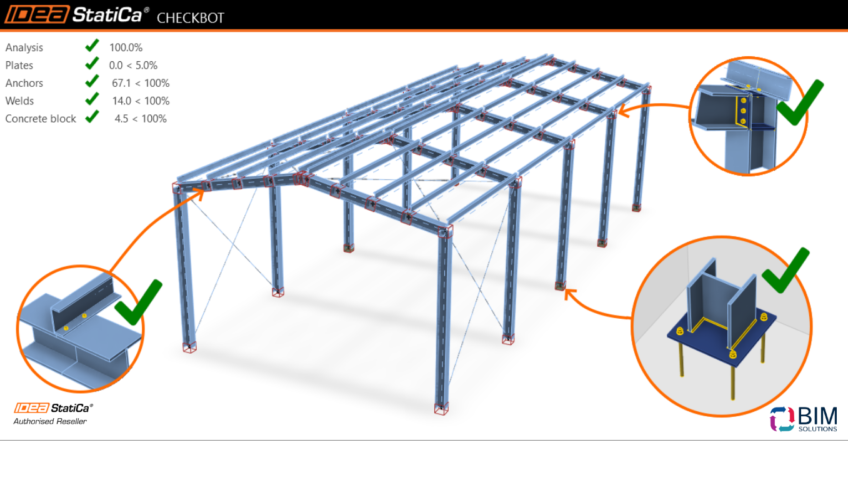
Tired of manual data chaos and uncertain complex designs? 25.1's expanded anchoring covers cast-in plates and multi-surface designs. Bulk design and update connections with faster reporting, and retrofit existing concrete with smooth rebars and unbonded tendons. Plus, there's a new ETABS/SAP2000-to-Detail workflow for critical concrete wall checks. Version 25.1 Highlights For too long, structural engineers designing critical elements have been forced to rely on manual data extraction, time-consuming modeling from scratch, or overly conservative estimations. Whether you’re copying global analysis results into Excel for concrete reinforcement calculations, trying to design D-regions using linear methods, struggling with inefficient bulk connection reports, or unable to accurately assess older structures, these manual roadblocks cost you time, reduce reliability, and slow down your projects. Anchoring: New use-cases and unification If you’ve ever needed to analyze multi-surface anchoring or check cast-in plates, IDEA StatiCa 25.1 has expanded the Steel-to-Concrete workflow to cover over 75% of real-world anchoring cases under Eurocode, no more risky workarounds. New anchor types for cast-in-place design (Headed studs, L-shape reinforcement) are fully code-checked to EN 1992-4. Design anchoring, no matter whether cast-in-place or post-installed, check the steel in Connection, and export to Detail to verify sufficient reinforcement and concrete capacity. You can now model multi-surface anchoring, avoid overconservative shear checks, and reflect real base plate setups, Stand-off, Direct, Mortar joint, Gap. All structural calculation data is unified across Connection and Detail for a comprehensive anchoring analysis. Bulk connection design workflow efficiency Calculation reports for big groups of connections used to be a bottleneck. Now, Checkbot cuts a 30-connection report time down to 6 minutes, which is 3 times faster than before. You can also apply members' offsets and eccentricities, align steel surfaces, and apply multiple parametric templates to one joint. The calculation process for groups includes a progress bar and the possibility of canceling the calculation. Buckling checks can be toggled for entire groups, meaning you can calculate them all in one go. The workflow is faster, simpler, and built for big structural models. Your complete ETABS (SAP2000) to DETAIL workflow When you're designing critical concrete walls, all the geometry and forces are already in your global FEA model. But tools like ETABS and SAP2000 use linear methods, which are not suitable for D-regions. That means you might get a green tick when checking your design, but it’s based on assumptions that don’t hold and is, in fact, a risky workaround, not real safety. Now, you can send geometry and design forces straight from ETABS or SAP2000 into IDEA StatiCa Detail 2D, no data loss, no rework. Use the right method (CSFM) to reinforce and code-check D-regions for ULS and SLS in minutes, with full support for Eurocode, ACI, and Australian standards, avoid relying on false positives and get checks you can trust. Retrofitting and Strengthening of Existing Structures Millions of structures built in the '70s–'80s use smooth reinforcement that typical software can't handle. That’s no longer a blocker. Detail 2D and 3D now support smooth reinforcement, covering EN, ACI, and AUS codes, with proper bond strength, anchorage, stiffness, and crack checks. You can also design with unbonded prestressing for strengthening bridges and precast elements. Article From: www.ideastatica.com

Read more

DDScad 21 – Comprehensive MEP project planning

Welcome to the next chapter in innovative MEP planning. With DDScad 21, comprehensive project planning becomes even more efficient and precise. A new range of enhancements supports your expertise and streamlines every step of the design and documentation process. Discover how these improvements help you achieve outstanding results and shape innovative projects with confidence. Overview of the main innovations Discover the new possibilities of DDScad 21: Advanced automations, improved editing, realistic visualizations, and smart quality controls deliver even greater efficiency and precision in building systems design and documentation. See how these latest features make everyday planning smoother, safer, and more flexible. AI Assistant The new AI Assistant in DDScad 21 is your virtual companion during the planning process. It provides you with immediate support at any time: simply ask your questions and receive specific answers about features and workflows – no more searching. Incorporating cable and conductor weights in the design of cable management systems according to IEC 61537 Safe cable management: The new auto weight calculation instantly highlights when load limits are exceeded. Monitor, visualize, and optimize your cable management systems effortlessly – efficiently and in full compliance with standards. Configuration of security cameras including visualization of coverage areas Tailored surveillance planning: Flexibly adapt the coverage areas of security cameras to any situation and visualize the coverage directly in the model – for maximum control and planning freedom. Cross-discipline use of symbols provided in DDScad Greater freedom in design: Use the complete DDScad symbol library from all MEP disciplines across, allowing you to design your models more flexibly and in greater detail than ever. New 3D representations for switches and sockets Perfect design and presentation: The new 3D symbols for switches and sockets in DDScad deliver maximum detail and realism for your projects. Aligning to snapping aids: Precise placement and modeling using projected target points Precision modeling at your fingertips: Snap to dynamic guides and place components with pinpoint accuracy. The result: exact, efficient planning every time. Source/reference model change: Marking products with lost position reference Stay on top of changes: Objects that lose their position reference after updating the IFC reference model are now automatically highlighted. You can easily identify, review, and swiftly update the references for affected items, keeping you in control and your model up to date at all times. Editability of properties for DDScad system and manufacturer components used in the project Maximum flexibility: Edit system and manufacturer components directly in your project and enjoy effortless, project-wide updates at the touch of a button. Automatic placement of smoke detectors (VdS 2095) and visualization of coverage areas Fire safety made easy: Automatic placement and standards-compliant coverage in DDScad bring speed, accuracy, and security to your smoke detector planning.     Try out the enhanced features of DDScad and reap the benefits today! Article source: www.graphisoft.com

Read more

BORA Flagship Store in Herford, Germany

In 2023, after two years of construction, the new BORA flagship store opened in Herford, Germany: a building that looks as if the wind itself had shaped it. This impressive building with a total area of 2,000 m² offers space for state-of-the-art kitchen exhibitions, professional training, a restaurant, and events. Der Dlubal-Kunde Werkraum Ingenieure ZT war verantwortlich für die statische Berechnung dieser besonderen Stahl-Beton-Konstruktion mit der markanten Fassade aus Metall und Glas. Werkraum nutzte dabei RFEM für die Bemessung des oberirdischen Stahltragwerkes sowie der unterirdischen Stahlbetonbauteile. Zudem wurden dynamische Analysen durchgeführt. Die Stahlkonstruktion hat mit ca. 95 m Länge, 33 m Breite und 14 m Höhe beeindruckende Dimensionen. Bereits von außen zieht der Neubau alle Blicke auf sich. Die Kombination aus verzinkten und unterschiedlich perforierten Stahlteilen mit eingefärbten Glaselementen sorgt mit der auskragenden Bauweise für den Effekt, als würde das gesamte Gebäude schweben. Diese dynamische Struktur integriert sich mühelos in die Umgebung. Unterhalb dieses 100 m langen auskragenden Baus befindet sich der witterungsgeschützte Parkplatz. Auf einer Höhe von 13,5 m bietet das Dach des Flügels aus Glas und Metall eine weitere Besonderheit. Hier sorgen zwei Schiebedächer von 63 m² Fläche für eine helle einladende Atmosphäre im Innenraum. Nicht nur optisch bietet der BORA Flagshipstore Innovationen, denn mit einem KfW Standard 55 verbraucht es nur etwa 55 % der Energie, verglichen mit einem konventionellen Neubau. Der Neubau des BORA Flagshipstores ist ein sehr besonderes Gebäude, das sich gleichzeitig nahtlos in die Umgebung einfügt und Innovation ausstrahlt. Ein wirklich interessantes Kundenprojekt, bei dem die Software RFEM aus dem Hause Dlubal sowohl für die Fassade als auch die Stahlkonstruktion zum Einsatz kam. Article From: www.dlubal.com

Read more

Wareing Buildings takes control of its workflow, with Tekla PowerFab

Looking for a way to truly digitise the business and its everyday processes, by using a central information management system to help efficiently control, track and deliver jobs, Wareing Buildings, the UK fabricator of structural steelwork, once again turned to Trimble and its trusted Tekla software portfolio for help. Based in Lancashire, Wareing Buildings offers a complete steel service to its clients, designing, fabricating and installing structural steelwork, in addition to cladding, external façades and timber work. Despite already employing digital technology and BIM within the company at the design stage of a project, including Tekla Structures, Tekla Structural Designer and the cloud-based Trimble Connect, the way Wareing Buildings actually managed its everyday activity, including the processing, tracking and delivery of steel fabrication jobs, remained a largely manual process.   Talking about the decision to digitise the business, Matt Hastwell, Senior Draughtsman at Wareing Buildings, said: "It was clear that a change was needed; in fact, it was something that had been brewing for a number of years. While some areas of the business were already technologically advanced, such as our use of BIM modelling software, the practical, daily running of the business had various inefficiencies, with our teams relying predominantly on a disjointed and traditional paper-based system. We knew that we needed an information management system, through which all of our daily activity, including material ordering, fabrication schedules and deliveries, could be easily processed, managed and accessed." "It was around this point that we heard about Trimble’s launch of Tekla PowerFab. One of the key appeals for us was the software’s usability and simplicity. Unlike Tekla Structures and Tekla Structural Designer, which are only used by the relevant teams, PowerFab, by its very nature, was intended for business-wide use. We have a real mix of people at Wareing Buildings, with some not even owning a smartphone or tablet, and so we needed a software that was user-friendly." "Eight months after installing Tekla PowerFab as an information management system, the benefits have been clear to see. From the moment an order has been placed, everything after that point is now processed and tracked through PowerFab. We use it to manage material ordering and production control, with fabrication and work schedules also then generated using the software." Matt Hastwell, Senior Draughtsman at Wareing Buildings "Now, eight months after installing Tekla PowerFab as an information management system, the benefits have been clear to see. From the moment an order has been placed, everything after that point is now processed and tracked through PowerFab. We use it to manage material ordering and production control, with fabrication and work schedules also then generated using the software. All jobs are issued through the central system and sent to the correct division in our fabrication facility, whether that be steelwork, welding, painting or woodwork. It’s essentially a new central business hub, helping to bring all of our processes, data and information together in one place." In addition to material ordering and fabrication sequences, Wareing Buildings also applies PowerFab to the transport and logistics stage of its workflow, providing real-time information on what load are going on, to where and when. With such a high volume of steel passing through any fabricator’s production facility, there is the real potential for materials to be ‘lost’ along the way, especially if businesses are relying purely on an out-dated paper system. Matt continued: "Component tracking and traceability is a really important feature to us, for it offers complete and comprehensive levels of visibility - both internally and externally. As a business, it aids improved levels of communication and coordination between teams, for everyone in the company can access the system and immediately see at what stage a particular job is at or view a department’s work schedule for the week. Through the direct link with Tekla Structures, we can even move around a project’s 3D BIM model, click on any steel section and be provided with an up-to-date job status. All of our teams have access to PowerFab through a smart device, meaning that they can simply log once they have completed a job and the component’s status is then automatically updated." "By comparison, before we introduced PowerFab into the business, if we needed to know the current status of a job, it would involve us having to physically walk around our site and speak to each team individually. Understandably, this could take up a significant portion of our day – time that could be better spent elsewhere." As well as enhanced visibility internally, Wareing Buildings is also able to pass this benefit on to its customers and clients, helping to build stronger relationships and deliver an added value service, as Matt explained further: "Through Trimble Connect, a cloud-based platform that acts as a central BIM hub, our customers can log in and access the relevant PowerFab data for their project. Providing complete transparency, customers are able to see the current status of their fabrication job, receive updates and know when they can expect to receive the finished steel on site. In turn, this helps to build trust, providing them with added confidence in us as a business and also the assurance that the job will be fulfilled as promised." Wareing Buildings has also pushed PowerFab’s capabilities further, demonstrating the software’s flexibility and ability to adapt to a company’s individual requirements. One example is the use of PowerFab as a reporting tool. "Again, this is a real time saver for us, explained Matt. It enables us to use the data already stored within the central system to automatically generate reports or information that would otherwise take up a significant portion of our time to produce manually. For example, we have an automatic accountancy report scheduled weekly, which details every item that’s come in that week, what it cost, the status of the job and what needs to be paid, meaning that our accounts department no longer have to manually sort through invoices and material order lists." "We also have a weekly forecast report, which automatically provides us with a status of every current job and even generates a view of the following week’s production schedule, enabling us to plan accordingly and ensure continued high levels of efficiency." Talking about the benefits that Wareing Buildings has experienced since digitising its workflow with PowerFab, Matt said: "Even going beyond the improved visibility, traceability and efficiency levels, which are definitely the main advantages, there has also been other, more unexpected, benefits. For us, it has opened up lots of doors for small improvements within the business, areas that we may not have noticed or even been aware of previously. For example, we have recently added various quality control and inspection points within our welding, loading and painting departments, where team members will use PowerFab to monitor and record certain conditions throughout their workflow and a report will then be generated. Through this, we have been able to identify various areas needing improvement, make slight modifications to our processes, such as changing the way we dry our painted steel and even the paint product we use, and then monitor the results." Eight months on from Wareing Buildings’ installation of the software and the reaction of its staff to PowerFab and the new insight it enables has been overwhelmingly positive. "We knew that this was going to be a big challenge for us, with around 70 employees to get on board with this new, digital way of working," continued Matt. "However, after a phased introduction, the whole business has reacted really positively, enjoying the enhanced visibility, team coordination and the immediate access to productivity, wastage and cost figures that having such a central information management system provides. Through the trackability and monitoring, they have been able to really see their productivity levels and quality of work improve, providing added motivation." Tekla PowerFab forms part of Trimble’s Tekla software portfolio, offering a truly connected and streamlined workflow from initial project planning and design through to fabrication and on-site assembly.     Article from: www.trimble.com

Read more

Shaping the Istanbul skyline: Ziraat Towers and the power of digital tools

Discover how Kalyon Construction’s streamlined processes minimized errors and shrank the project's carbon footprint, setting new standards for efficiency. Ziraat Towers, the centerpiece of the new Istanbul Financial Center, showcases ways using digital design and collaboration tools improves processes and achieves sustainability goals. • The Ziraat Towers project, part of the new Istanbul Financial Center, was constructed using advanced digital tools, significantly reducing costs and construction time while ensuring technical accuracy and quality. • The complex comprises two glass towers with intricate facades, extensive office and retail spaces, and a cultural and event center, achieving LEED Platinum certification through sustainable practices and materials. • Kalyon Construction used digital tools to facilitate collaboration, minimize errors, and optimize processes, helping manage complexity, reduce the carbon footprint, and improve future project efficiency. Istanbul has been a cultural and economic bridge between the East and the West for centuries, and today a new icon is rising to continue this legacy. Istanbul Financial Center, a mixed-use project, encompasses 6 million square feet of office space, 1 million square feet of retail space, 750,000 square feet of hotels, and 650,000 square feet of residential development. A 2,000-seat cultural and event center rounds out the complex. Ziraat Towers, the headquarters of Turkey’s largest bank, will be the centerpiece of the new Istanbul Financial Center. The complex comprises two glass towers, one with 40 floors and one with 46 floors, for a total construction area of 430,000 square meters. Towers feature intricate facades, extensive office and retail spaces, and a cultural and event center, achieving LEED Platinum certification through sustainable practices and materials. From the beginning, digital tools have fundamentally shaped the construction process and results of the project. “The success of the Ziraat Towers project was about using the right tools, fostering teamwork and open communication,” says Belgin Çalışkan, BIM manager at Kalyon Construction. “The spirit of collaboration was key to overcoming challenges and delivering a world-class project.” A massive undertaking Completed by Kalyon Construction and designed by the architecture firm KPF, the complex comprises two glass towers atop a shared eight-story podium. This curvilinear glass podium is crossed by multiple bridges that connect the towers. At the ground level, the form of a water-smoothed stone—the auditorium and conference center—is clearly visible through the glass, drawing people into its tactile form. Landscaped gardens and a podium roof garden unite the towers and wrap the campus in green. A complex louvre system running along the entire length of the towers allows for ideal solar heat gain and shading, with a subtle flare outward as towers rise. These forms reference traditional Ottoman calligraphy, combining loping curves and punctuated verticality. Aligning goals with digital tools Parametric modeling was used to generate 9,420 unique glass panel forms. Image courtesy of Kaylon Construction. To manage this complex project, Kalyon Construction used digital tools, including Autodesk Revit, Navisworks, ACC Docs, BIM Collaborate Pro, and Dynamo. Autodesk Construction Cloud facilitated seamless communication among all project stakeholders, ensuring simultaneous access to accurate data for everyone involved. Consequently, the risk of information and document clutter, particularly in such a vast construction area, was effectively eliminated. The coordination of approximately 40 subcontractors and stakeholders was efficiently managed using 3D Revit and Navisworks files, with the shop drawings created from Revit files. With the flowing, curvilinear facade, each glass panel was unique, and Kalyon needed parametric modeling tools to generate each form and fit it into the plan. Dynamo was used to generate 9,420 panels of varying sizes and a project-specific 18,840 square-meter curtain wall construction model. This process accelerated the production time of 3D models and shop drawings by 25% compared to the traditional method. “Dynamo provided significant optimizations in processes, such as generating 11,500 shop drawings and creating the facade fabrication model,” Çalışkan says. This automation helped the team easily adapt variables throughout the design process and minimize errors, reducing production time during the construction phase. As a result, building information modeling (BIM) streamlined workflows and reduced costs while shrinking the project timeline by two months. Operations, LEED, and simulation Ziraat Towers earned LEED Platinum certification, thanks in part to incorporating recycled materials, harnessing natural daylight, and lowering solar heat gain with Solar-E glass. Image courtesy of Kaylon Construction. Kalyon and the construction team used Autodesk Revit for 3D modeling and developing a digital twin. “The models of all disciplines created during the construction phase served as an important guide to ensure that construction was aligned with the design and implementation processes,” she says. “These models guaranteed the technical accuracy and quality standards of the building; they will facilitate a smooth and planned transition to the operational phase.” Throughout, these digital tools were used to minimize the carbon footprint of this massive new project, which helped the team meet their goal of attaining LEED Platinum certification. Materials made with recycled content were a top priority, as was selecting materials with low VOCs and other environmental product specifications that prioritize user health. Energy-efficient LED lighting systems were selected, and lighting automation keeps the lights off whenever possible. A daylight analysis was conducted to model how natural daylight enters the interior. Solar-E glass, which lowers solar heat gain, was used throughout the building. Furnishing measures, such as curtains and blinds, were implemented in areas with high glare. Additionally, “viewing 25,000 drawings in the cloud environment on mobile devices in the field resulted in a significant reduction in paper usage,” Çalışkan says. In addition to creating digital models of the Ziraat Towers, the construction team simulated the construction process with the models and created a plan to share real-time data and schedule critical tasks to run in parallel. “This integration enabled tracking of completed and delayed tasks, identification of critical activities, and the development of a more realistic and effective plan by monitoring planned quantities of materials and the work schedule,” Çalışkan explains. “This full suite of digital design and construction tools plays an active role in improving processes while remaining integrated into the way Kalyon works,” Çalışkan says. “These updates aim to make system setup faster and more efficient for future projects and ensure easier adaptation to challenging phases. The approach allows for faster and more consistent modeling processes in other projects, providing time savings through reusability. The lessons learned from this project will be used to optimize processes for more effective monitoring and management of project.   Article From: www.autodesk.com

Read more

Empowering Investors with Data-Driven Construction Management

Whether it is a stadium, hospital, luxury resort, residential, or infrastructure project, BEXEL Manager has been used to plan, track and control projects by investors around the world. Its high level of automatization using customizable templates, knowledge transfer through the template database, as well as a streamlined analyses update process with project changes, reinforces control in all stages of the project. A BIM model with accurate information and a data layer is crucial for valuable and trustworthy analysis throughout all project stages. Regular automated data checks in BEXEL Manager verify and control the information layer, adding value to the designer`s output, and providing high-quality, data-rich BIM models ready for further analyses. American Institute of Architects and Association of General Contractors estimate clashes encountered on construction sites to have an average cost of 1500$ per instance. Preventing on-site collisions and rework, and enabling a smooth construction process, is saving time and resources and reducing costs. BEXEL Manager`s algorithm for clash detection and reporting dashboards creates a streamlined way toward clash-free project documentation. An accurate bill of quantities and smooth collaboration and communication between project participants provide a precise project budget, even in the early project stages. BEXEL Manager integrates the investor`s cost base and generates a detailed and structured budget, enabling budget analytics grouped by various criteria. With the data-rich 4D/5D construction schedule defined, BEXEL Manager takes it a step further with cash flow analysis (i.e., “S Curve” or cost diagrams). This allows the investor to reduce waste, recognize and capture best practices and increase profit margins. Automated resource analyses within BEXEL Manager, give way for precise procurement plans and timely mechanization engagement, mitigating delays or bottlenecks and saving on storage and transport. Using the full potential of the 4D/5D BIM model, data-rich construction schedules including cost and quantities for each task are generated and optimized in BEXEL Manager, providing detailed construction planning, eliminating unnecessary tasks, and ensuring there are no omitted activities. Connections of the construction schedule and BIM model elements within BEXEL Manager, provide instant construction simulations and give foresight in the construction of the project. Time-location conflicts are easily resolved using a line-of-balance diagram. This provides control and the possibility to impose work norms and reduce rework and optimize time and material expenses. BIM-based progress tracking provides extensive analytics, allowing timely actions and decisions, through regular automated updates of the construction plan with every progress input and revision accordingly. All these streamlined processes enable the generation of regular payment certificates, based on quantities of exact executed elements in the BIM model, providing clarity to both sides, and reducing claims and disputes. Within the BEXEL Manager, as-built documentation can be linked to BIM model elements, and regularly checked if it is complete. Adding the Facility management dimension to an integrated environment, BEXEL Manager helps investors and facility managers improve the process of long-term maintenance planning and monitoring of the operational phase. Using the synergy of BEXEL Manager`s integrated BIM and Portfolio Manager cloud-based reporting engine, top management gets clear insight into project key performance indicators, on a portfolio level. In the AEC industry, the BIM environment has become the widespread solution for investors to have full insight throughout a project`s lifecycle. However, with so many different software for different BIM analyses out there, a single platform, as a single source of truth has proved itself indispensable. According to the World economic forum’s Future of construction survey integrated BIM is seen as a new technology that will most likely have the highest impact on the AEC industry. BEXEL Manager offers a variety of optimization and productivity improvements throughout the entire project lifecycle, therefore engaging all project stakeholders in the BIM process. One of the BCG`s researches shows that by 2025, full-scale digitalization of construction projects will lead to annual cost savings of 13% to 21% in the design, engineering, and construction while 10% – 17% in the operational phase. Article From: www.bexelmanager.com

Read more