

In the fast-paced world of architectural visualization and 3D modeling, efficiency, accuracy, and visual appeal are key. Architects, designers, and creators look for tools that streamline the creative process, allowing them to focus more on the design and less on technical obstacles. This is where the powerful combination of Twinmotion and SketchUp shines, offering an intuitive workflow that marries robust 3D modeling with stunning, real-time rendering.
In this blog post, we’ll explore why the integration of Twinmotion and SketchUp is a game-changer for designers and how you can make the most out of both tools for your projects.
What is SketchUp?
SketchUp has long been a favorite tool among architects, interior designers, and 3D enthusiasts. Known for its ease of use, flexibility, and powerful 3D modeling capabilities, SketchUp allows you to quickly sketch and develop 3D designs. Its intuitive interface makes it an excellent choice for both beginners and professionals, providing the perfect balance of simplicity and depth.
What is Twinmotion?
Twinmotion, on the other hand, is a cutting-edge real-time rendering software that brings your 3D models to life with stunning visuals. Developed by Epic Games and powered by Unreal Engine, Twinmotion offers intuitive tools that make creating photorealistic renders, immersive VR experiences, and engaging animations a breeze. The drag-and-drop interface, real-time updates, and vast library of materials, lights, and assets make Twinmotion an essential tool for anyone looking to enhance their visual presentations.
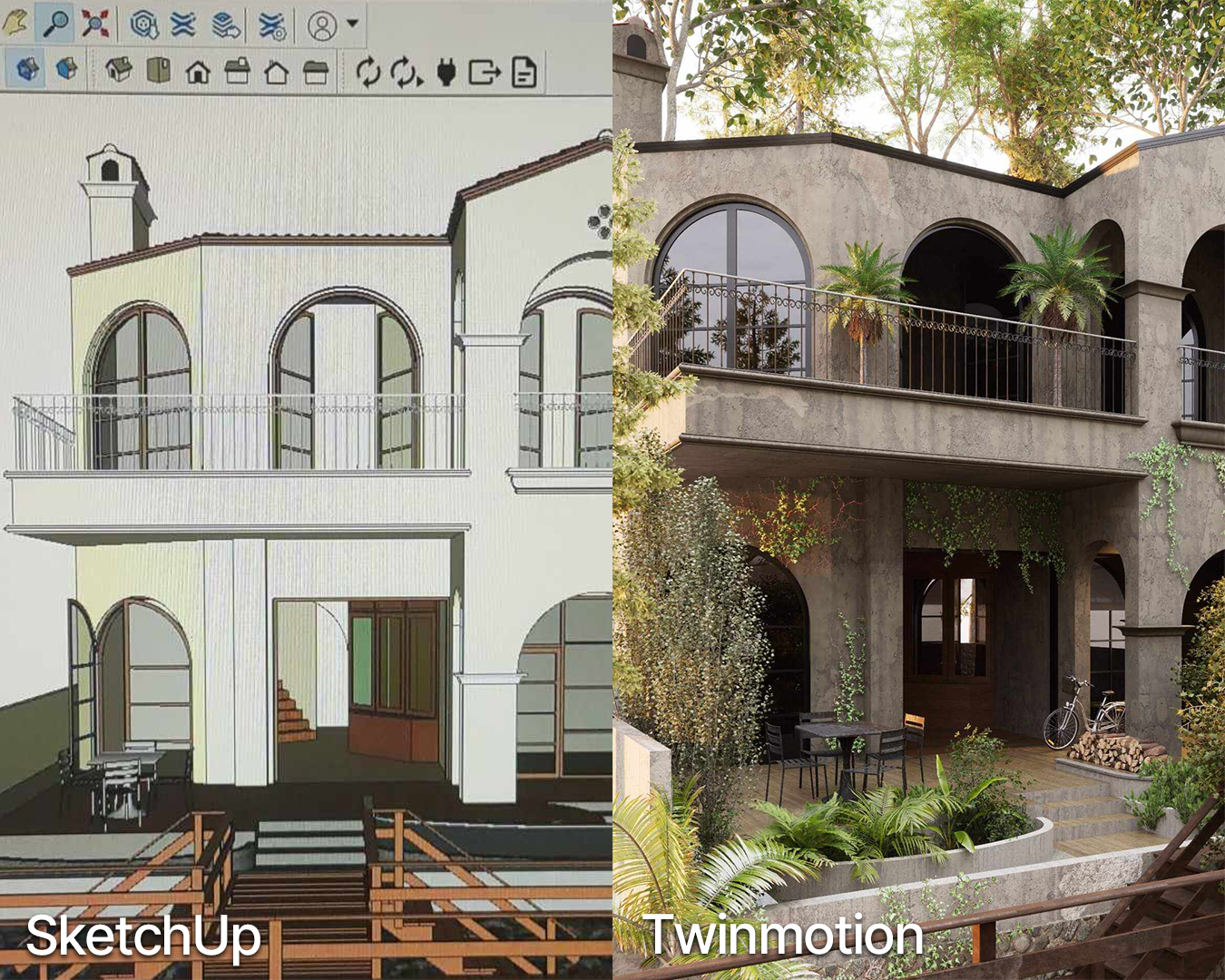
Why Collaboration Between Twinmotion and SketchUp Works
The combination of Twinmotion and SketchUp has become a standard for many 3D designers and architects, and for good reasons:
1. Seamless Workflow
The collaboration between Twinmotion and SketchUp is exceptionally smooth. Twinmotion supports direct file import from SketchUp, meaning you can work on your 3D models in SketchUp and quickly bring them into Twinmotion without losing any data. This seamless transfer allows you to start visualizing your designs immediately, saving time and eliminating the need for complicated file conversions.
2. Real-Time Visualization
One of the most powerful features of Twinmotion is its ability to render scenes in real time. You can adjust lighting, materials, objects, and environments in Twinmotion and see the changes instantly. When combined with SketchUp’s 3D modeling capabilities, this real-time feedback allows you to experiment and iterate designs faster, leading to more refined outcomes.
3. Expanded Asset Library
Twinmotion’s extensive asset library is another reason why its partnership with SketchUp is so effective. With access to a vast collection of high-quality materials, vegetation, people, vehicles, and objects, you can significantly enhance the realism of your SketchUp models. You can quickly populate your scenes and bring them to life, making presentations more compelling and professional.
4. High-Quality Rendering Made Easy
Gone are the days when creating photorealistic renders required complex setups and a steep learning curve. Twinmotion makes it easy to produce high-quality visuals with just a few clicks. Whether you want to generate static images, videos, or VR-ready files, Twinmotion provides multiple rendering options that are both user-friendly and visually stunning. When combined with SketchUp’s detailed modeling, you can create impactful presentations that communicate your design vision effectively.
5. Efficiency for All Skill Levels
Both SketchUp and Twinmotion are known for their intuitive and beginner-friendly interfaces. However, they also offer deep features for advanced users, making them suitable for designers at any skill level. The integration ensures that even if you’re new to 3D modeling or real-time rendering, you can still produce professional results quickly.

Tips to Maximize Your Twinmotion and SketchUp Workflow
1. Keep Your SketchUp Model Organized
Organizing your SketchUp model by using groups, layers, and scenes will make the transition to Twinmotion much smoother. A well-structured model allows you to efficiently manage elements when applying materials, adjusting lighting, or making environmental changes in Twinmotion.
2. Use Twinmotion’s Lighting Tools for Realism
Lighting can make or break a visual presentation. While SketchUp allows basic lighting setups, Twinmotion’s advanced lighting tools, such as global illumination and dynamic sunlight, will enhance realism. Take advantage of these features to create atmospheric scenes and highlight architectural elements.
3. Experiment with Materials and Textures
Twinmotion offers a wide variety of materials and texture options, many of which support real-world physics. When importing your SketchUp model, explore Twinmotion’s materials to replace and fine-tune the look of your objects. Realistic textures can elevate the impact of your design and create visually engaging visuals.
4. Make Use of Twinmotion’s Weather and Time Controls
Twinmotion allows you to dynamically adjust weather conditions and the time of day, which adds a unique dimension to your presentations. Show how your design looks under different lighting scenarios—from a sunny afternoon to a moody sunset—by utilizing Twinmotion’s time slider.
5. Utilize VR for Immersive Presentations
Take your presentations to the next level with Twinmotion’s VR capability. Import your SketchUp model into Twinmotion, fine-tune the scene, and then export it to a VR platform for an immersive experience. This is a fantastic way to engage clients and stakeholders by allowing them to virtually explore your design.

The Future of 3D Design with Twinmotion and SketchUp
The collaboration between Twinmotion and SketchUp is transforming the 3D design and visualization landscape. With a streamlined workflow, intuitive interfaces, and powerful features, designers can focus more on the creative process and less on technical barriers. As both tools continue to evolve, the synergy between them will only grow, opening up more opportunities for immersive, real-time design and presentation.
For designers looking to bridge the gap between 3D modeling and high-quality visualization, the integration of Twinmotion and SketchUp is a powerful and practical choice. With SketchUp’s intuitive 3D modeling capabilities and Twinmotion’s ability to create stunning, real-time visuals, you can elevate your design projects to new heights. Whether you are working on architectural visualizations, interior design, or landscape projects, this combination is sure to provide you with a streamlined, efficient, and visually impactful workflow.