

If you’re ready to access the latest AI and drafting capabilities that AutoCAD has to offer, open the Autodesk Access application to start your update. On behalf of the entire Autodesk team, welcome to AutoCAD 2025:
“Autodesk is committed to creating the most performant CAD tool in the market. In AutoCAD 2025, you’ll be able to open 2D files up to two times faster than in 2024*,” said Marcus O’Brien, Vice President of AutoCAD.
For architecture, engineering, and construction firms, AutoCAD 2025 will deliver deeper connections across the Autodesk portfolio. “When AutoCAD customers use Autodesk Docs, they’ll be able to take advantage of a truly connected experience in the cloud,” said Dania El Hassan, Director of AutoCAD Product Management. “Using Markup Import, customers can share their PDF files in Docs for feedback and instantly see those markups in AutoCAD, making design iterations faster across geographically distributed teams.”
AutoCAD 2025 also enhances your 2D and 3D design experience with features that continue to unlock insights and automation with the help of Autodesk AI. “I’m proud that we are accelerating customers’ work with powerful AI for the CAD industry,” said El Hassan. “By targeting the most used workflows, AutoCAD enables customers to focus on their most creative work, leading to better outcomes and leading the CAD industry in the age of AI.”
Keep reading to learn more about some of the latest capabilities in AutoCAD 2025.
Smart Blocks
First introduced in AutoCAD 2024 with the Placement and Replacement features, Smart Blocks represents just one of the ways AutoCAD continues to leverage Autodesk AI to improve the core 2D drafting experience. AutoCAD 2025 now introduces two new capabilities that will help you improve design efficiency through content reuse and standardization across your drawings.
“The new Smart Blocks features we’ve released in AutoCAD 2025 represent our commitment to innovation and delivering value to our customers,” said El Hassan.
Use Smart Blocks: Search and Convert to quickly organize geometry into blocks. This tool enables you to search drawings by selecting geometry and highlighting all matching objects found on the canvas, providing options to convert them into instances of a block with the help of Autodesk AI.
“Search and Convert allows for a more efficient workflow within AutoCAD. Blocks can get lost or be challenging to work with, and this feature allows for a more efficient approach, saving time and quickly creating new blocks from elements within the drawing.”
—Joe VanderPluym, Design Associate
And with the new Smart Blocks: Object Detection Tech Preview, you can scan drawings for objects to convert into blocks. This tool is designed to help you save time when cleaning up drawings that have been drafted without the use of blocks, created with non-AutoCAD-based applications, or imported from other file formats like PDF.
“We’re excited to release Object Detection as a Tech Preview in AutoCAD 2025,” said Britta Ritter Armour, Senior Product Manager, AutoCAD data and AI. “It’s a new type of feature that allows us to enhance capabilities throughout the year, without requiring users to update.”
Autodesk Assistant
First introduced in the AutoCAD and AutoCAD LT 2024.1 update, Autodesk Assistant gives customers quick access to help resources using the built-in palette. With AutoCAD 2025, Autodesk Assistant is now enhanced with Autodesk AI for a conversational interface that provides generative responses.
“Previously, I had always used other tools for seeking information, but then you always need to specify much more if you want to find something that works for your specific problem. The Autodesk Assistant actually gives me the correct commands directly in the reply, exactly what I would need from an AI assistant.”
—Markus Karlsson, Senior Designer, Shipbuilding
Enhancements for Projects on Autodesk Docs
AutoCAD 2025 introduces several enhancements for customers who manage design projects using Autodesk Docs—our cloud-based common data environment available with the AEC Collection. With Markup Import, you can now connect PDF files with markups made in Autodesk Docs into AutoCAD to continuously synchronize changes made by collaborators using the full set of markup tools available in Docs.
In AutoCAD 2025, Activity Insights has been enhanced to include detailed event properties and the ability to filter by DWG version with robust file comparison capabilities—merging features from the previous DWG History tool—to create one source for exploring all drawing changes over the course of a design. Versioning is now supported for drawings managed on Autodesk Docs, requiring no additional setup or configuration to view Activity Insights. Start tracking over 35 activity types that can be viewed using Activity Insights palette or directly from the AutoCAD Start Tab—without requiring you to open drawings.
ArcGIS® Basemaps
Ground your projects with real-world geographical information using Esri’s ArcGIS® Basemaps, now available directly in AutoCAD 2025.
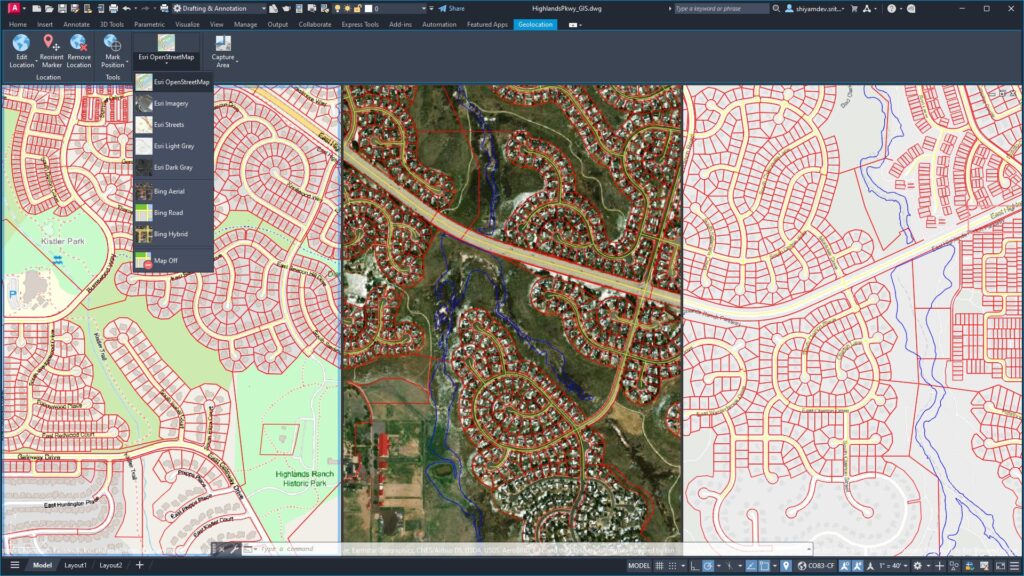
Access five Basemaps in the form of high-resolution satellite and aerial imagery, OpenStreetMaps and Streets, along with light and dark gray monochrome map styles, providing architects, engineers, and construction professionals with the foundations to make informed decisions.
Source: www.autodesk.com